Part 7: Running the study script
In the main
pycopancorerepository folder (not the package folder!), call the script like this:PYTHONPATH="." python studies/run_my_exploit.py
If you made no mistakes, you should see a lot of output, roughly structured like this:
At first the model configures itself. This happens at the point in the script code where
Modelis instantiated viamodel = M.Model(). During this self-configuration, the model analyses its own structure and tells the user what it found in three different hierarchical lists.It first lists all model components, entity-types and process taxons used in each component, and variables and processes used and contributed by each component to each class:
Configuring model exploit tutorial ( <class 'pycopancore.models.my_exploit.Model'> ) ...
Analysing model structure...

Model component  my exploit: growth ( <class 'pycopancore.model_components.my_exploit_growth.model.Model'> )...
    Entity-type  <class 'pycopancore.model_components.my_exploit_growth.implementation.cell.Cell'>
        Variable  extensive variable 'fish stock' (stock of a generic local resource 'fish' that can grow and be harvested), not None, scale=ratio, datatype=<class 'float'>, unit=t fish [t], >=0
        Variable  extensive variable 'fish capacity' (limit to fish stock due to competition for resources), not None, scale=ratio, datatype=<class 'float'>, unit=t fish [t], >=0
        Process  fish growth (ODE)
    Process taxon  <class 'pycopancore.model_components.my_exploit_growth.implementation.environment.Environment'>
        Variable  intensive variable 'basic fish growth rate' (basic rate at which fish would grow without competition), not None, scale=ratio, datatype=<class 'float'>, unit=[a^-1], >=0
Model component  my exploit: fishing ( <class 'pycopancore.model_components.my_exploit_fishing.model.Model'> )...
    ...
It then again lists all variables appearing in the composed model, by entity-type and process taxon, but no longer caring in which components they occurr:
Variables:
  Entity-type  <class 'pycopancore.models.my_exploit.World'>
    Variable  environment(uid=0.08591877944338966)
    Variable  metabolism(uid=0.03203445696610063)
    Variable  culture(uid=0.9052984695216689)
    Variable  extensive variable 'human population', IAMC=Population, CETS=SP.POP, not None, scale=ratio, datatype=<class 'float'>, unit=people [H], >=0
    Variable  extensive variable 'atmospheric carbon stock' ((mass of C in any chemical compound)), not None, scale=ratio, datatype=<class 'float'>, unit=gigatonnes carbon [GtC], >=0
    Variable  intensive variable 'surface air temperature' ((in the meaning used in climate policy debates,
                 i.e., at 2m above surface, averaged over the day)), AMIP=tas, not None, scale=ratio, datatype=<class 'float'>, unit=kelvins [K], >=0
    Variable  extensive variable 'ocean carbon stock' ((mass of C in any chemical compound)), not None, scale=ratio, datatype=<class 'float'>, unit=gigatonnes carbon [GtC], >=0
    Variable  extensive variable 'terrestrial carbon stock' ((mass of C in any chemical compound)), not None, scale=ratio, datatype=<class 'float'>, unit=gigatonnes carbon [GtC], >=0
    Variable  extensive variable 'fossil carbon stock' ((mass of C in any chemical compound,
                             potentially accessible for human extraction
                             and combustion)), not None, scale=ratio, datatype=<class 'float'>, unit=gigatonnes carbon [GtC], >=0
    Variable  social systems(uid=0.41401426897646976)
    Variable  top level social systems(uid=0.0008966739545156477)
    Variable  cells(uid=0.05318452850985511)
    Variable  individuals(uid=0.5385475206516981)
  Entity-type  <class 'pycopancore.models.my_exploit.SocialSystem'>
    ...
It does the same for all processes happening in the composed model, also telling us which variables are affected by the process and on which ‘input’ variables they depend because of this process:
Processes:
  Entity-type  <class 'pycopancore.models.my_exploit.World'>
    Process  aggregate cell carbon stocks (Explicit)
      Target var. World.terrestrial_carbon directly depends on {Cell.terrestrial_carbon}
      Target var. World.fossil_carbon directly depends on {Cell.fossil_carbon}
  Entity-type  <class 'pycopancore.models.my_exploit.SocialSystem'>
    ...

Targets affected by some process: OrderedSet([World.terrestrial_carbon, World.fossil_carbon, Cell.fish_stock, Cell.total_fishing_effort, Cell.total_catch, Individual.catch, Culture.worlds.individuals.fishing_effort])
For variables which are set by explicit equations, the order of evaluation of these equations matters, so pycopancore reports next which order it will use to make sure dependent variables are computed after those variables they depend on:
Order of evaluation of variables set by explicit equations:
   World.terrestrial_carbon
   World.fossil_carbon
   Cell.total_fishing_effort
   Cell.total_catch
   Individual.catch
This finished the self-configuration triggered by the line
model = M.Model():(End of model configuration)
The next output occurs when the model is run by calling
runner.run(...). The runner starts by evaluating allExplicitequations to compute the initial values of dependent variables:Running from 0 to 100 with output at least every 1 ... Initial application of Explicit processes...
It then asks all
Events when they occur first by calling their respective methods that return the next time point of occurrence:Finding times of first occurrence of Events... Event process update fishing effors (Event) ... time 0.6196357717485598 : <pycopancore.models.my_exploit.Culture object at 0x7efcffacf860>
If there were any processes of type
Step(which represent regularly timed thing such as elections or annual cycles implemented via difference equations), the runner would now call these a first time. Even though we have noSteptype processes in our model, we still see this line in the log:Executing Steps and finding times of next execution...
Then the runner iteratively repeats the following four things until the requested simulation time is reached.
(a) It ‘runs smoothly’ until the time at which the next event or step will occur (it knows already when this happens since it has asked the event processes). It does so by using some ODE solver to integrate all the
ODEs in the model, automatically also evaluating allExplicitequations that are needed to determine variables that occur in any of the ODEs:Running smoothly from 0 to 0.6196357717485598 ... Composing initial value array... Calling ODE solver... ...took 0.7260878086090088 seconds and 90 time steps Saving results to output dict...
(b) For this newly simulated time interval, it evaluated all remaining
Explicitequations to calculate the trajectories of variables that were not needed to evaluate the ODEs:Applying Explicit processes to simulated time points...
It executes the steps or events that happen next:
- Executing Steps and/or Events at 0.6196357717485598 …
- Event update fishing effors (Event) @ <pycopancore.models.my_exploit.Culture object at 0x7efcffacf860> …
next time 1.0721577757408507
(d) It again evaluates all
Explicitequations to see what indirect effect the steps or events have:Applying Explicit processes to changed state... Completing output dict...
The runner repeats (a)–(d) until the requested model time is reached:
Running smoothly from 0.6196357717485598 to 1.0721577757408507 ...
  ...
Running smoothly from 99.22698397375639 to 100 ...
This completes what happens when we called
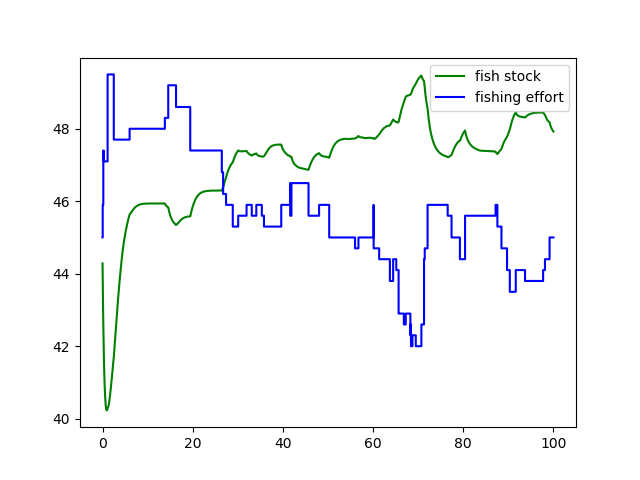
runner.run(...).Finally, our script should use the returned
trajobject to produce and show a plot like the following. Notice the vertical jumps in the fishing effort at irregular time points. For each such time, thetrajcontains two entries, one with the values right before the event happened, one with the values right after the event.
If the script completed successfully, you might like to consolidate your knowledge further by doing some exercises based on the tutorial model: Optional part 8: Further exercises